Security overview
Overview of Pinecone security features for production: API keys, SSO, service accounts, audit logs, CMEK encryption, backups, and Private Endpoints.
Access management
Section titled “Access management”API keys
Section titled “API keys”Each Pinecone project has one or more API keys. To make calls to the Pinecone API, a user must provide a valid API key for the relevant Pinecone project.
You can manage API key permissions in the Pinecone console. For the roles you can assign to an API key and the operations each role covers, see Project roles.
Organization single sign-on (SSO)
Section titled “Organization single sign-on (SSO)”SSO allows organizations to manage their teams' access to Pinecone through their identity management solution. Once your integration is configured, you can require that users from your domain sign in through SSO, and you can specify a default role for teammates when they sign up. SSO is available on Standard and Enterprise plans.
For more information, see configure single sign on.
Role-based access controls (RBAC)
Section titled “Role-based access controls (RBAC)”Pinecone uses role-based access controls (RBAC) to manage access to resources.
Service accounts, API keys, and users are all principals. A principal's access is determined by the roles assigned to it. Roles are assigned to a principal for a resource, either a project or an organization. The roles available to be assigned depend on the type of principal and resource.
You can manage roles in the Pinecone console or programmatically with the Admin API. For more information, see Manage roles and access.
Service account roles
Section titled “Service account roles”A service account can be assigned roles for the organization it belongs to, and any projects within that organization. For more information, see Organization roles and Project roles.
API key roles
Section titled “API key roles”An API key can be assigned any project role except ProjectOwner, ProjectManager, and ProjectMember, and only for the project it belongs to. For more information, see API keys.
User roles
Section titled “User roles”A user can be assigned roles for each organization they belong to, and any projects within that organization. For more information, see Organization roles and Project roles.
Compliance
Section titled “Compliance”Audit logs
Section titled “Audit logs”Audit logs provide a detailed record of user and API actions that occur within Pinecone.
Events are captured every 30 minutes and each log batch will be saved into its own file as a JSON blob, keyed by the time of the log to be written. Only logs since the integration was created and enabled will be saved.
Audit log events adhere to a standard JSON schema and include the following fields:
{
    "id": "00000000-0000-0000-0000-000000000000",
    "organization_id": "AA1bbbbCCdd2EEEe3FF",
    "organization_name": "example-org",
    "client": {
        "userAgent": "rawUserAgent"
    },
    "actor": {
        "principal_id": "00000000-0000-0000-0000-000000000000",
        "principal_name": "example@pinecone.io",
        "principal_type": "user", // user, api_key, service_account
        "display_name": "Example Person" // Only in case of user
    },
	"event": {
        "time": "2024-10-21T20:51:53.697Z",
        "action": "create",
        "resource_type": "index",
        "resource_id": "uuid",
        "resource_name": "docs-example",
        "outcome": {
            "result": "success",
            "reason": "", // Only displays for "result": "failure"
            "error_code": "", // Only displays for "result": "failure"
        },
        "parameters": { // Varies based on event
        }
	}
}
The following events are captured in the audit logs:
- Organization events
- Project events
- Index events
- User and API key events
- Security and governance events
Organization events
Section titled “Organization events”| Action | Query parameters |
|---|---|
| Rename org | event.action: update, event.resource_type: organization, event.resource_id: NEW_ORG_NAME |
| Delete org | event.action: delete, event.resource_type: organization, event.resource_id: DELETED_ORG_NAME |
| Create org member | event.action: create, event.resource_type: user, event.resource_id: [ARRAY_OF_USER_EMAILS] |
| Update org member | event.action: update, event.resource_type: user, event.resource_id: { user: USER_EMAIL, role: NEW_ROLE } |
| Delete org member | event.action: delete, event.resource_type: user, event.resource_id: USER_EMAIL |
Project events
Section titled “Project events”| Action | Query parameters |
|---|---|
| Create project | event.action: create, event.resource_type: project, event.resouce_id: PROJ_NAME |
| Update project | event.action: update, event.resource_type: project, event.resource_id: PROJECT_NAME |
| Delete project | event.action: delete, event.resource_type: project, event.resource_id: PROJECT_NAME |
| Invite project member | event.action: create, event.resource_type: user, event.resource_id: [ARRAY_OF_USER_EMAILS] |
| Update project member role | event.action: update, event.resource_type: user, event.resource_id: { user: USER_EMAIL, role: NEW_ROLE } |
| Delete project member | event.action: delete, event.resource_type: user, event.resource_id: { user: USER_EMAIL, project: PROJ_NAME } |
Index events
Section titled “Index events”| Action | Query parameters |
|---|---|
| Create index | event.action: create, event.resource_type: index, event.resouce_id: INDEX_NAME |
| Update index | event.action: update, event.resource_type: index, event.resource_id: INDEX_NAME |
| Delete index | event.action: delete, event.resource_type: index, event.resource_id: INDEX_NAME |
| Create backup | event.action: create, event.resource_type: backup, event.resource_id: BACKUP_NAME |
| Delete backup | event.action: delete, event.resource_type: backup, event.resource_id: BACKUP_NAME |
User and API key events
Section titled “User and API key events”| Action | Query parameters |
|---|---|
| User login | event.action: login, event.resource_type: user, event.resouce_id: USERNAME |
| Create API key | event.action: create, event.resource_type: api-key, event.resource_id: API_KEY_ID |
| Delete API key | event.action: delete, event.resource_type: api-key, event.resource_id: API_KEY_ID |
Security and governance events
Section titled “Security and governance events”| Action | Query parameters |
|---|---|
| Create Private Endpoint | event.action: create, event.resource_type: private-endpoints, event.resource_id: PRIVATE_ENDPOINT_ID |
| Delete Private Endpoint | event.action: delete, event.resource_type: private-endpoints, event.resource_id: PRIVATE_ENDPOINT_ID |
Data protection
Section titled “Data protection”Customer-managed encryption keys (CMEK)
Section titled “Customer-managed encryption keys (CMEK)”Data within a Pinecone project can be encrypted using customer-managed encryption keys (CMEK). This allows you to encrypt your data using keys that you manage in your cloud provider's key management system (KMS). Pinecone supports CMEK using Amazon Web Services (AWS) KMS.
For Bring Your Own Cloud (BYOC), you use KMS on infrastructure in your own account rather than this console CMEK integration.
Backup and recovery
Section titled “Backup and recovery”A backup is a static copy of your index that only consumes storage. It's a non-queryable representation of a set of records. You can create a backup of an index, and you can create a new index from a backup. This allows you to restore the index with the same or different configurations.
For more information, see Understanding backups.
Encryption at rest
Section titled “Encryption at rest”Pinecone encrypts stored data using the 256-bit Advanced Encryption Standard (AES-256) encryption algorithm.
Encryption in transit
Section titled “Encryption in transit”Pinecone uses standard protocols to encrypt user data in transit. Clients open HTTPS or gRPC connections to the Pinecone API; the Pinecone API gateway uses gRPC connections to user deployments in the cloud. These HTTPS and gRPC connections use the TLS 1.2 protocol with 256-bit Advanced Encryption Standard (AES-256) encryption.
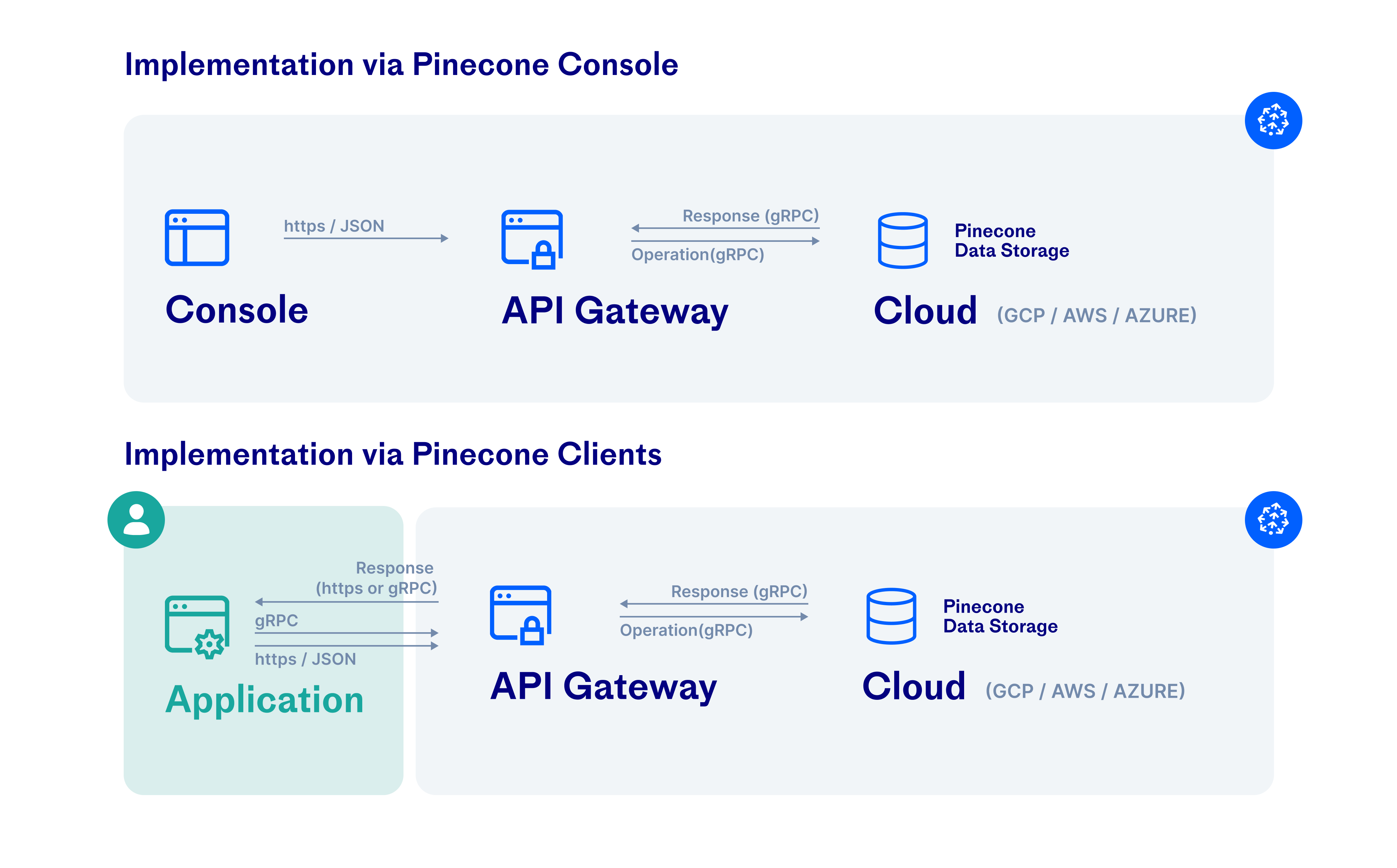
Traffic is also encrypted in transit between the Pinecone backend and cloud infrastructure services, such as S3 and GCS. For more information, see Google Cloud Platform and AWS security documentation.
Network security
Section titled “Network security”Private Endpoints
Section titled “Private Endpoints”Use Private Endpoints to connect via AWS PrivateLink or Azure Private Link. This establishes private connectivity between your Pinecone serverless indexes and your cloud VPC/VNet while keeping traffic off the public internet.
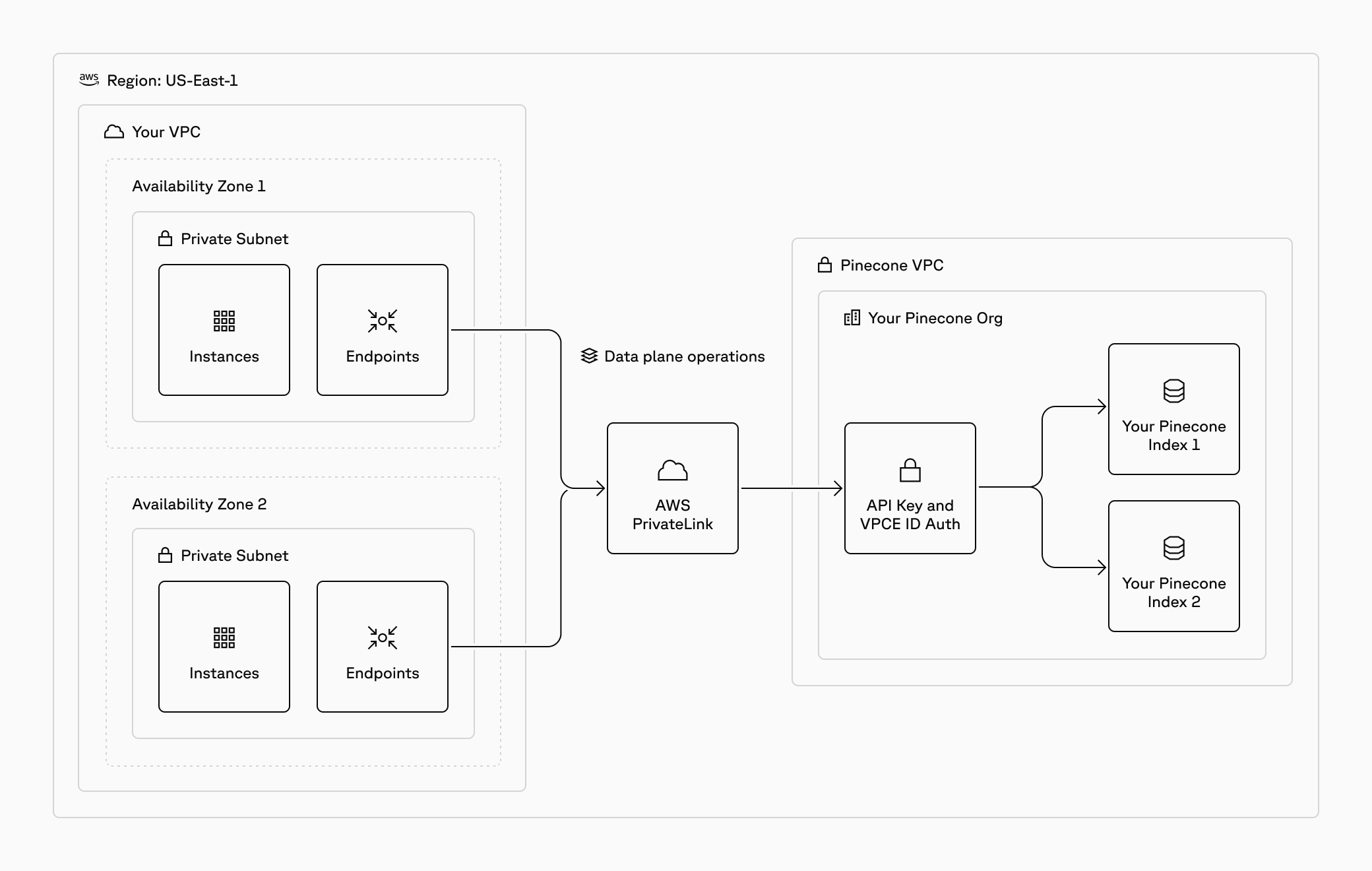
Private Endpoints are additive to other Pinecone security features: data is also encrypted in transit, encrypted at rest, and an API key is required to authenticate.
Proxies
Section titled “Proxies”The following Pinecone SDKs support the use of proxies: