Index data overview
Learn how indexing works in Pinecone: serverless indexes, schemas, namespaces, integrated embedding, and metadata filtering.
Indexes
Section titled “Indexes”In Pinecone, you store data in an index, typically one per use case. Every index is defined by a schema that declares its fields. What the schema can hold, and which API reads and writes the index, is set when you create it. There are two kinds: new indexes are document indexes by default, and vector indexes remain fully supported.
Document index
Section titled “Document index”You define a schema with pc.indexes.create (or POST /indexes).
- One schema can combine
dense_vector,sparse_vector, andfull_text_search-enabledstringfields. - A single index can serve full-text search (BM25 with Lucene queries), semantic search, and sparse-vector search together, often covering what previously required two indexes.
- Holds documents, read and written through the Documents API. Pick the ranking signal per query with
score_by.
Vector index
Section titled “Vector index”Created with pc.create_index(dimension=..., metric=..., vector_type=...). You don't declare fields yourself; the SDK builds the schema from the dimension, metric, and vector type you provide.
- Holds records, read and written through the Vectors API.
- Serves semantic search and sparse-vector search.
Search approaches
Section titled “Search approaches”How you rank results depends on the fields your index declares.
Full-text search
Section titled “Full-text search”Full-text search is BM25 token matching with Lucene query syntax over text fields in your schema, string fields you've declared with full_text_search enabled. No model required: Pinecone handles tokenization, IDF, and length normalization at index time and BM25 scoring at query time.
When you search, you rank results via score_by: text (BM25), query_string (Lucene), dense_vector, or sparse_vector. All scoring methods can be combined with metadata filters, including the text match operators ($match_phrase, $match_all, $match_any) for phrase and token matching. For example:
{
  "score_by": [{ "type": "text", "fields": ["body"], "query": "machine learning" }],
  "top_k": 10
}
Reach for full-text search when relevance comes down to specific tokens appearing in both the query and the data, such as SKUs, error messages, code, and named entities. For semantic similarity over natural-language queries, see Semantic search. For retrieval with a learned sparse encoder, see Sparse-vector search.
Learn more:
Semantic search
Section titled “Semantic search”A dense vector encodes the meaning of text, images, or other data as a fixed-length list of numbers. Items with similar meaning sit close to each other in vector space, and a query returns the records closest to the query vector. This is semantic search (also called nearest neighbor search, similarity search, or vector search).
For the underlying concept, see Dense vector.
Learn more:
Sparse-vector search
Section titled “Sparse-vector search”A sparse vector represents tokens (or token-like features) and their weights, with the vast majority of dimensions zero. A query returns records that share the most weighted tokens with the query vector, which is called sparse-vector search.
Sparse vectors come from a sparse embedding model. Pinecone hosts pinecone-sparse-english-v0; you can also bring your own. For the underlying concept and the distinction from full-text search, see Index with sparse vectors.
Learn more:
Limitations
Section titled “Limitations”Indexes of sparse vectors have the following limitations:
-
Max non-zero values per sparse vector: 2048
-
Max upserts per second per index of sparse vectors: 10
-
Max queries per second per index of sparse vectors: 100
-
Max
top_kvalue per query: 10,000 -
Max query results size: 4 MB
Namespaces
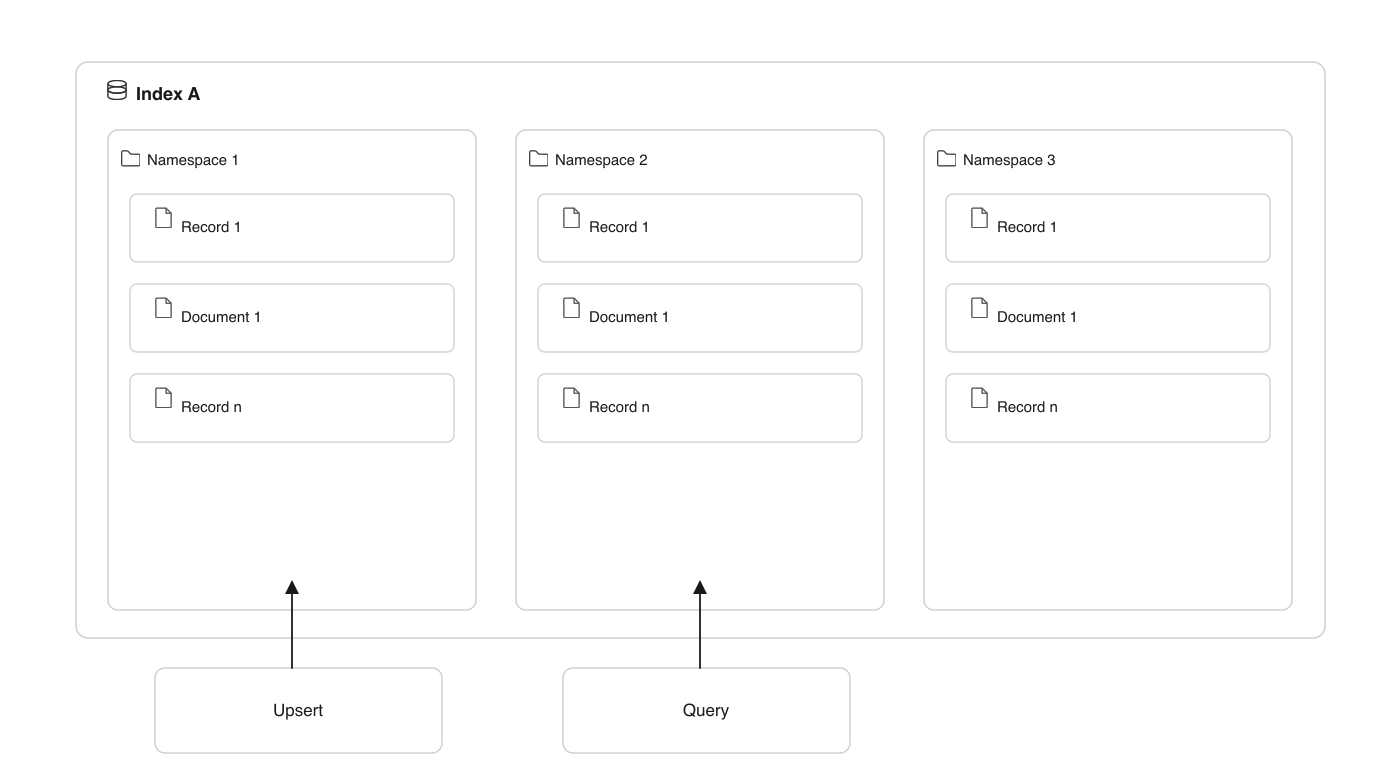
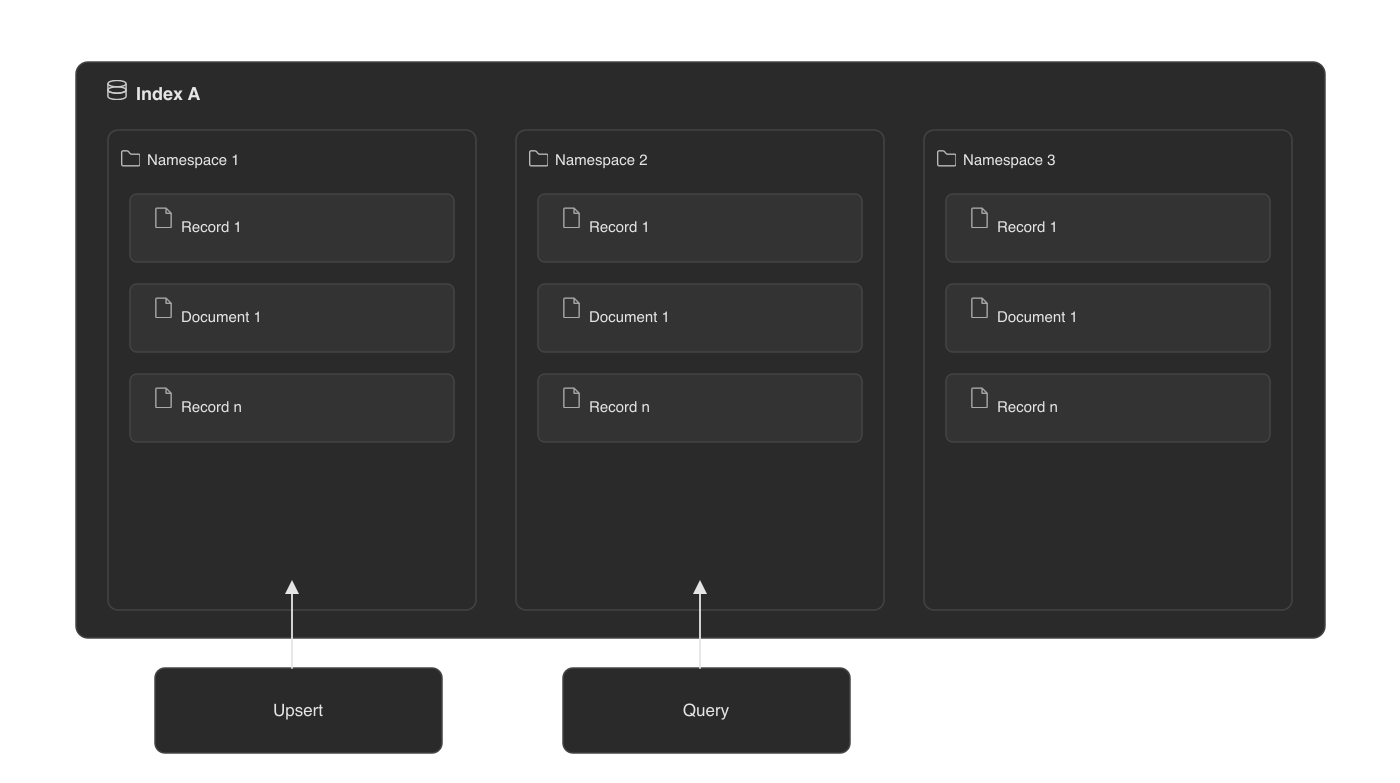
Section titled “Namespaces”Within an index, records or documents are partitioned into namespaces, and all upserts, queries, and other data read and write operations always target one namespace. This has two main benefits:
-
Multitenancy: When you need to isolate data between customers, you can use one namespace per customer and target each customer's writes and queries to their dedicated namespace. See Implement multitenancy for end-to-end guidance.
-
Faster queries: When you divide your data into namespaces in a logical way, you speed up queries by ensuring only relevant records or documents are scanned. The same applies to fetching them, listing their IDs, and other data operations.
Namespaces are created automatically during upsert. If a namespace doesn't exist, it's created implicitly.
Vector embedding
Section titled “Vector embedding”A schema declares the vector fields your index uses: a dense vector field, a sparse vector field, or both. Dense vectors represent the semantics of data such as text, images, and audio; sparse vectors capture keyword information.
To turn your source data into vectors, you use an embedding model. You can either use Pinecone's integrated embedding models to convert your data to vectors automatically, or use an external embedding model and bring your own vectors to Pinecone.
Integrated embedding
Section titled “Integrated embedding”Integrated-embedding indexes are created with pc.create_index_for_model and read and written through the Records API. Pinecone generates the vectors from your text automatically, both when you upsert and when you search.
- Create an index that's integrated with one of Pinecone's hosted embedding models.
- Upsert your source text. Pinecone uses the integrated model to convert the text to vectors automatically.
- Search with a query text. Again, Pinecone uses the integrated model to convert the text to a vector automatically.
Bring your own vectors
Section titled “Bring your own vectors”- Use an embedding model to convert your text to vectors. The model can be hosted by Pinecone or an external provider.
- Create an index that matches the characteristics of the model.
- Upsert your vectors directly.
- Use the same external embedding model to convert a query to a vector.
- Search with your query vector directly.
Metadata
Section titled “Metadata”Every record has an ID and a vector, and every document has an _id and the fields its schema declares. Either can also carry metadata: extra key-value fields you filter on at query time. In a vector index, you pass metadata as an explicit object with each vector. With integrated embedding or in a document index, extra fields you upsert are stored as metadata automatically. Pinecone indexes metadata for filtering, so a query can include a metadata filter to limit the search. Searches without a metadata filter don't consider metadata and search the entire namespace. All metadata fields are indexed by default; to index only the fields you filter on, see Configure metadata indexing.
Metadata format
Section titled “Metadata format”- Metadata fields must be key-value pairs in a flat JSON object. Nested JSON objects aren't supported.
- Keys must be strings and must not start with a
$. - Values must be one of the following data types:
- String
- Integer (converted to a 64-bit floating point by Pinecone)
- Floating point
- Boolean (
true,false) - List of strings
- Null metadata values aren't supported. Instead of setting a key to
null, remove the key from the metadata payload.
Examples
{
  "document_id": "document1",
  "document_title": "Introduction to Vector Databases",
  "chunk_number": 1,
  "chunk_text": "First chunk of the document content...",
  "is_public": true,
  "tags": ["beginner", "database", "vector-db"],
  "scores": ["85", "92"]
}{
"document": { // Nested JSON objects are not supported
"document_id": "document1",
"document_title": "Introduction to Vector Databases",
},
"$chunk_number": 1, // Keys must not start with a `$`
"chunk_text": null, // Null values are not supported
"is_public": true,
"tags": ["beginner", "database", "vector-db"],
"scores": [85, 92] // Lists of non-strings are not supported
}Metadata size
Section titled “Metadata size”Pinecone supports 40 KB of metadata per record or document. full_text_search string fields aren't metadata and don't count toward this limit. Each full_text_search string field is limited to 100 KB and 10,000 tokens.
Metadata filter expressions
Section titled “Metadata filter expressions”Pinecone's filtering language supports the following operators:
| Operator | Function | Supported types |
|---|---|---|
$eq |
Matches records or documents with metadata values that are equal to a specified value. Example: {"genre": {"$eq": "documentary"}} |
Number, string, boolean |
$ne |
Matches records or documents with metadata values that aren't equal to a specified value. Example: {"genre": {"$ne": "drama"}} |
Number, string, boolean |
$gt |
Matches records or documents with metadata values that are greater than a specified value. Example: {"year": {"$gt": 2019}} |
Number |
$gte |
Matches records or documents with metadata values that are greater than or equal to a specified value. Example:{"year": {"$gte": 2020}} |
Number |
$lt |
Matches records or documents with metadata values that are less than a specified value. Example: {"year": {"$lt": 2020}} |
Number |
$lte |
Matches records or documents with metadata values that are less than or equal to a specified value. Example: {"year": {"$lte": 2020}} |
Number |
$in |
Matches records or documents with metadata values that are in a specified array. Example: {"genre": {"$in": ["comedy", "documentary"]}} |
String, number |
$nin |
Matches records or documents with metadata values that aren't in a specified array. Example: {"genre": {"$nin": ["comedy", "documentary"]}} |
String, number |
$exists |
Matches records or documents with the specified metadata field. Example: {"genre": {"$exists": true}} |
Number, string, boolean |
$and |
Joins query clauses with a logical AND. Example: {"$and": [{"genre": {"$eq": "drama"}}, {"year": {"$gte": 2020}}]} |
- |
$or |
Joins query clauses with a logical OR. Example: {"$or": [{"genre": {"$eq": "drama"}}, {"year": {"$gte": 2020}}]} |
- |
$not |
Matches records or documents that don't match the wrapped clause. Example: {"genre": {"$not": {"$eq": "drama"}}} |
- |
For example, the following has a "genre" metadata field with a list of strings:
{ "genre": ["comedy", "documentary"] }This means "genre" takes on both values, and requests with the following filters will match:
{"genre":"comedy"}

{"genre": {"$in":["documentary","action"]}}

{"$and": [{"genre": "comedy"}, {"genre":"documentary"}]}
However, requests with the following filter will not match:
{ "$and": [{ "genre": "comedy" }, { "genre": "drama" }] }Additionally, requests with the following filters will not match because they're invalid. They will result in a compilation error:
# INVALID QUERY:
{"genre": ["comedy", "documentary"]}# INVALID QUERY:
{"genre": {"$eq": ["comedy", "documentary"]}}