Pinecone Assistant
Next.js sample chat app that connects to a Pinecone Assistant for grounded answers over uploaded PDFs with citations and file references.
Built with
Section titled “Built with”- Pinecone Assistant API
- Next.js + tailwind
- Node version 20 or higher
Run the sample app
Section titled “Run the sample app”The fastest way to get started is to use the create-pinecone-app CLI tool to get up and running:
npx -y create-pinecone-app@latest --template pinecone-assistantGet your API key
Section titled “Get your API key”You need an API key to make API calls to your Pinecone project:
Then copy your generated key:
PINECONE_API_KEY="{{YOUR_API_KEY}}"Alternatively, follow these steps:
- Open the Pinecone console.
- Select your project.
- Go to API Keys.
- Copy your API key.
Create a Pinecone Assistant
Section titled “Create a Pinecone Assistant”You can create a Pinecone Assistant in the console, or by following the instructions here.
Start the project
Section titled “Start the project”Requires Node version 20+
Dependency installation
Section titled “Dependency installation”From the project root directory, run the following command:
cd pinecone-assistant && npm installMake sure you have populated the .env file with relevant keys:
PINECONE_API_KEY="your-pinecone-api-key-here"
PINECONE_ASSISTANT_NAME="your-pinecone-assistant-name-here"
# Set this if you want users chatting with your assistant to be able to see
# and click into the files used as references in answers
SHOW_ASSISTANT_FILES=true
Start the app:
npm run devProject structure
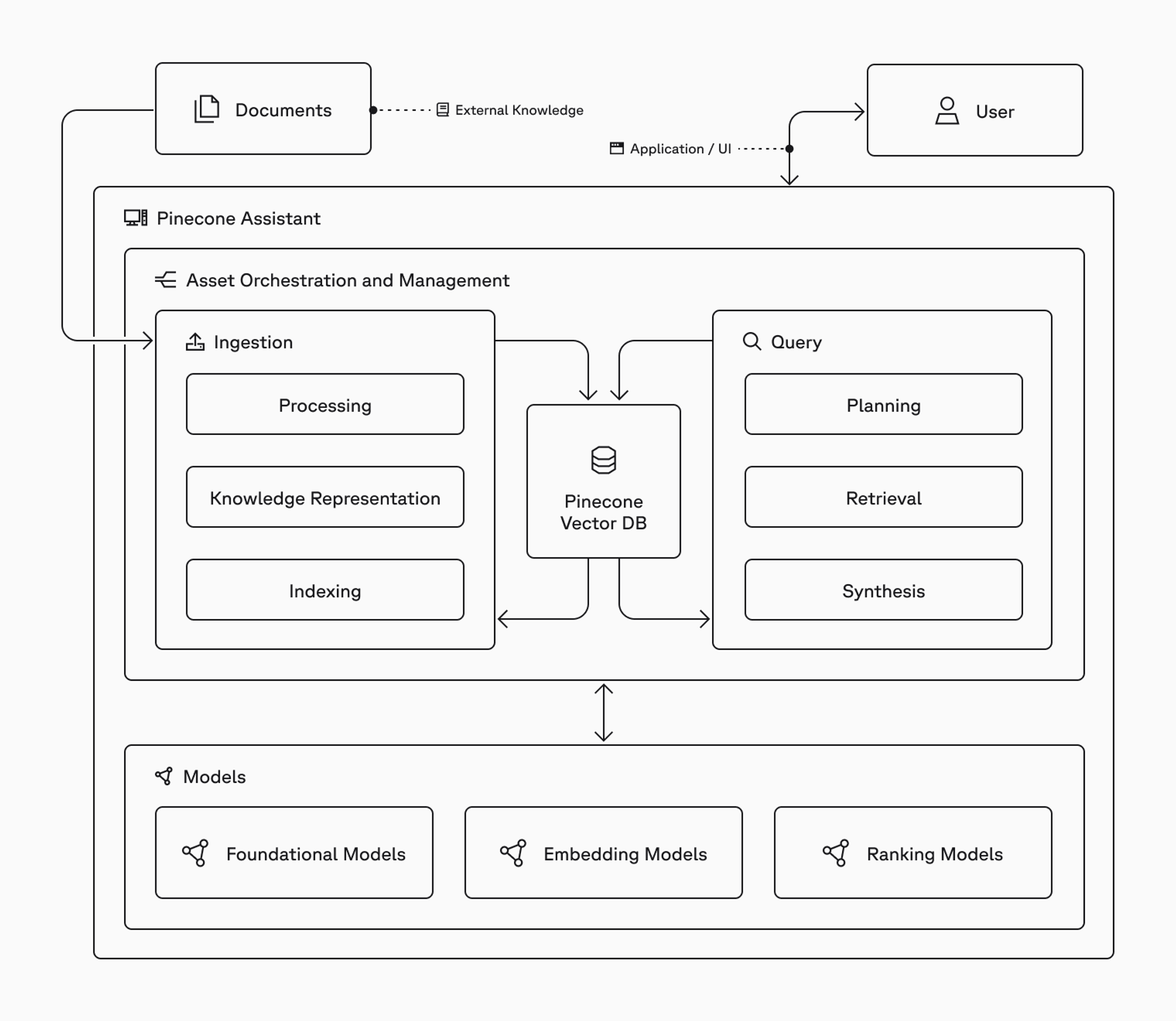
Section titled “Project structure”This project uses a standard Next.js application structure with API routes for backend functionality.
Frontend client
The frontend uses Next.js, Tailwind CSS, and custom React components to power the chat interface.
Backend server
This project uses Next.js API routes to proxy requests to the Pinecone Assistant API.
Key features
Section titled “Key features”-
Connect to existing Pinecone Assistant: Connect to an existing Pinecone Assistant to provide a chat experience that can be hosted privately or publicly.
-
Streaming responses: Ask questions of the assistant and get responses streamed to the frontend in real-time.
-
Reference highlighting: Documents that were used in answering user questions are highlighted as references.
Implementation details
Section titled “Implementation details”Server action for chat
The server action creates a stream with Pinecone Assistants:
'use server'

import { createStreamableValue } from 'ai/rsc'
import { EventSource } from 'extended-eventsource';

type Message = {
  role: string;
  content: string;
}

export async function chat(messages: Message[]) {

  // Create an initial stream, which we'll populate with events from the Pinecone Assistants API
  const stream = createStreamableValue()

  // Construct the full URL to the Pinecone Assistant API for the specific assistant
  // indicated by the user
  const url = `${process.env.PINECONE_ASSISTANT_URL}/${process.env.PINECONE_ASSISTANT_NAME}/chat/completions`

  const eventSource = new EventSource(url, {
    method: 'POST',
    body: JSON.stringify({
      stream: true,
      messages,
    }),
    headers: {
      Authorization: `Bearer ${process.env.PINECONE_API_KEY}`,
      'X-Project-Id': process.env.PINECONE_ASSISTANT_ID!,
    },
    disableRetry: true,
  });

  // When we receive a new message from the Pinecone Assistant API, we update the stream
  // unless the Assistant is done, in which case we close the stream
  eventSource.onmessage = (event: MessageEvent) => {
    const message = JSON.parse(event.data)
    if (message?.choices[0]?.finish_reason) {
      eventSource.close();
      stream.done();
    } else {
      stream.update(event.data)
    }
  };

  eventSource.onerror = (error) => {
    console.error('EventSource error:', error);
    eventSource.close();
  };

  return { object: stream.value }
}
Chat functionality
The chat functionality in the Home component consumes the stream from the server action and updates the UI in real-time:
const handleChat = async () => {
    if (!input.trim()) return;

    const newUserMessage: Message = {
      id: uuidv4(), // Generate a unique ID
      role: 'user',
      content: input,
      timestamp: new Date().toISOString()
    };

    setMessages(prevMessages => [...prevMessages, newUserMessage]);
    setInput('');
    setIsStreaming(true);

    try {
      const { object } = await chat([newUserMessage]);
      let accumulatedContent = '';
      const newAssistantMessage: Message = {
        id: uuidv4(),
        role: 'assistant',
        content: '',
        timestamp: new Date().toISOString(),
        references: []
      };

      setMessages(prevMessages => [...prevMessages, newAssistantMessage]);

      // Process the response stream from the Assistant that is created in the ./actions.ts Server action
      for await (const chunk of readStreamableValue(object)) {
        try {
          const data = JSON.parse(chunk);
          const content = data.choices[0]?.delta?.content;

          if (content) {
            accumulatedContent += content;
          }

          setMessages(prevMessages => {
            const updatedMessages = [...prevMessages];
            const lastMessage = updatedMessages[updatedMessages.length - 1];
            lastMessage.content = accumulatedContent;
            return updatedMessages;
          });

        } catch (error) {
          console.error('Error parsing chunk:', error);
        }
      }

      // Extract references after the full message is received
      const extractedReferences = extractReferences(accumulatedContent);
      setReferencedFiles(extractedReferences);

    } catch (error) {
      console.error('Error in chat:', error);
      setError('An error occurred while chatting.');
    } finally {
      setIsStreaming(false);
    }
  };
Troubleshooting
Section titled “Troubleshooting”Experiencing any issues with the sample app? Submit an issue, create a PR, or post in our community forum!